
Understanding Block and inline Elements
Ever wonder why some HTML elements hog the whole line while others sit side-by-side like best friends?

nanadwumor
-
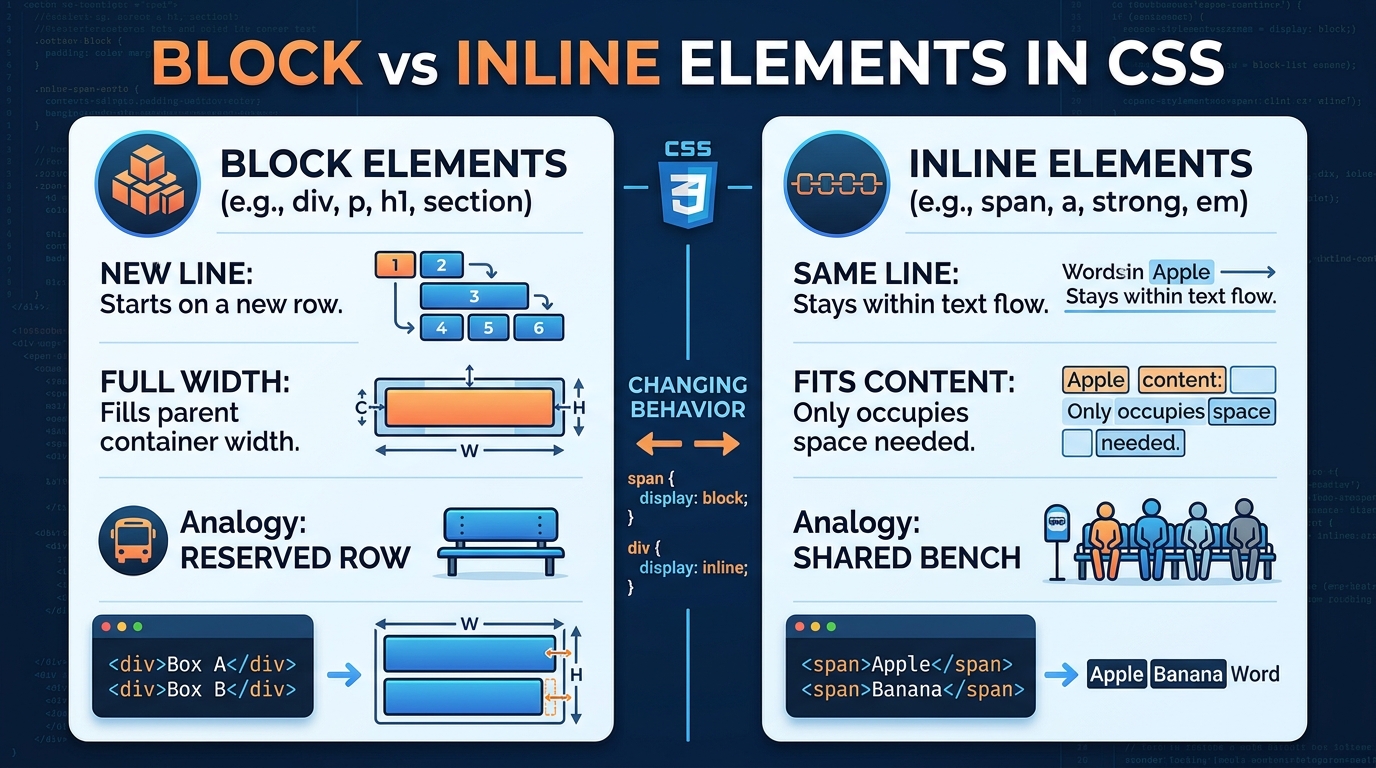
Display Roles: Determine how HTML elements handle layout, spacing, and width.
-
Block Elements: Start on new lines and span full container width (e.g., <div>, <p>).
-
Inline Elements: Flow within text and only take required space (e.g., <span>, <a>).
-
CSS display: Overrides default element behaviors between block and inline.
RECOMMENDED ARTICLES
Types of Elements in CSS
A CSS element may look simple, but knowing whether it is replaced or nonreplaced helps you understand how the browser displays and styles it. CSS elements are broadly divided into replaced and nonreplaced elements. Replaced elements display...
Understanding HTML Elements in CSS
Before you can style a webpage with CSS, you first need to understand the elements that CSS is designed to style. Elements are the building blocks of webpages. Examples include headings, paragraphs, images, links, and buttons. HTML elements are...
How to Select Following Siblings in CSS
What if you want to style a paragraph that is far away from a heading but still inside the same container? CSS has a neat trick for that. The [crayon-6ac0f06b34036609116726-i/] selector styles elements that come later in the same parent. Elements...
Understanding Block and Inline Elements
In the previous module, you learned about replaced and nonreplaced elements.
Now we will study another important way CSS classifies elements:
Block-level elements
Inline-level elements
Understanding these two concepts is essential because they affect:
Layout
Spacing
Width and height
Positioning
Responsive design
Many beginner CSS problems happen because they do not understand the difference between block and inline elements.
What Are Display Roles?
Every HTML element has a display behavior.
This behavior determines:
How the element appears on the page
Whether it starts on a new line
Whether other elements can sit beside it
This behavior is called the element’s display role.
The two most common display roles are:
Block
Inline
Block-Level Elements
What is a Block-Level Element?
A block-level element starts on a new line and usually takes up the full width available within its parent container.
Think of it as demanding its own row on the page.
|
1 2 |
<p>First paragraph</p> <p>Second paragraph</p> |
Output
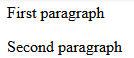
Notice that each paragraph starts on a new line.
The second paragraph cannot sit beside the first one.
How Block Elements Behave
By default, block elements:
Start on a new line
Occupy available width
Push surrounding content above or below themselves
Allow width and height adjustments easily
Common Block-Level Elements
Examples include:
|
1 2 3 4 5 6 7 8 |
<div></div> <p></p> <h1></h1> <h2></h2> <section></section> <article></article> <header></header> <footer></footer> |
These elements naturally create separate blocks on the page.
Simple Analogy
Imagine passengers boarding a bus.
A block-level element behaves like a passenger who books an entire row for themselves.
Nobody can sit beside them in that row.
The next passenger must move to another row.
Visual Example
HTML
|
1 2 3 |
<div>Box A</div> <div>Box B</div> <div>Box C</div> |
Ouptut

Each element occupies its own line.
Inline-Level Elements
An inline element does not start on a new line.
Instead, it stays within the flow of surrounding text.
Example
|
1 2 3 4 |
<p> I love <strong>CSS</strong> and <em>HTML</em>. </p> |
Output

The elements remain inside the sentence.
They do not create new lines.
How Inline Elements Behave
Inline elements:
Stay within text flow
Do not start new lines
Only occupy the space they need
Allow other content beside them
Common Inline Elements
Examples include:
|
1 2 3 4 5 |
<span></span> <a></a> <strong></strong> <em></em> <label></label> |
These elements usually affect small portions of content.
Simple Analogy
Imagine people standing in a queue.
Each person occupies only the space they need.
Others can stand directly beside them.
That is how inline elements behave.
Visual Example
HTML
|
1 2 3 |
<span>Apple</span> <span>Banana</span> <span>Orange</span> |
Output

Real-Life Example
Consider a news article.
The article structure might use block elements:
|
1 2 3 |
<h1>Breaking News</h1> <p>First paragraph...</p> <p>Second paragraph...</p> |
Inside those paragraphs, inline elements may be used:
<p>
The president visited
<strong>Accra</strong>
today.
</p>
The paragraph is block-level. The strong element is inline.
List Items: A Special Type of Block Element
List items behave like block elements but have an additional marker.
Examples:
|
1 2 3 4 5 |
<ul> <li>Rice</li> <li>Beans</li> <li>Fish</li> </ul> |
Output

The bullet is called a marker.
Apart from the marker, list items behave much like normal block elements.
Understanding HTML vs CSS Display Rules
This is where many beginners become confused.
In HTML
Certain nesting rules exist.
For example:
|
1 2 3 |
<span> <div>Hello</div> </span> |
This is considered invalid HTML because a block element should not normally be placed inside an inline element.
In CSS
CSS is more flexible.
An element’s display behavior can be changed.
For example:
|
1 2 3 |
span { display: block; } |
Now the span behaves like a block element.
Introducing the display Property
CSS provides a property called:
display
This property controls how an element behaves on the page.
Examples:
|
1 2 3 4 5 6 |
span { display: block; } div { display: inline; } |
You can make an inline element behave like a block element and vice versa.
Memory Aid
Think of a classroom.
Block Element
A student occupies an entire desk.
Nobody shares that desk.
New student → new desk.
Inline Element
Several students share a long bench.
They sit side by side.
That is exactly how inline elements behave.
|
1 2 3 4 5 6 |
span { display: block; } div { display: inline; } |
You can make an inline element behave like a block element and vice versa.
Recent Comments