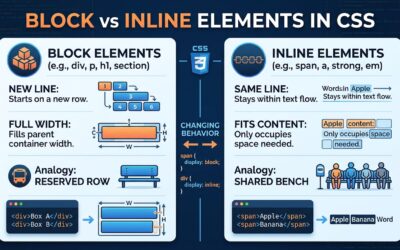

A CSS element may look simple, but knowing whether it is replaced or nonreplaced helps you understand how the browser displays and styles it. CSS elements are broadly divided into replaced and nonreplaced elements. Replaced elements display...
Understanding HTML Elements in CSS
Before you can style a webpage with CSS, you first need to understand the elements that CSS is designed to style. Elements are the building blocks of webpages. Examples include headings, paragraphs, images, links, and buttons. HTML elements are...
How to Select Following Siblings in CSS
What if you want to style a paragraph that is far away from a heading but still inside the same container? CSS has a neat trick for that. The [crayon-6ab7faa17eae9769909656-i/] selector styles elements that come later in the same parent. Elements...
How to Use the Child Combinator in CSS
How to target exactly the elements you want with CSS combinators! > selects direct children only (e.g., h2 > em) Space selects all descendants, any depth (e.g., h2 em) Combinators can be combined (e.g., div.sale p > em) + selects...
Descendant Selectors in CSS
Unlock the power of CSS by learning how HTML’s hierarchy shapes every style you apply! HTML elements form nested parent-child structures. Parents are directly above children; ancestors can be higher up. Descendant selectors style elements inside a...
identifiers in CSS
The secret power of CSS identifiers, the tiny names that give you full control over your styles! Identifiers are custom CSS names you create. CSS treats similar names with different cases as unique. Used in list counters like...