
Connecting CSS to HTML
Without HTML to build the structure and CSS to paint the picture, your website is just invisible code waiting for a connection.

nanadwumor
-
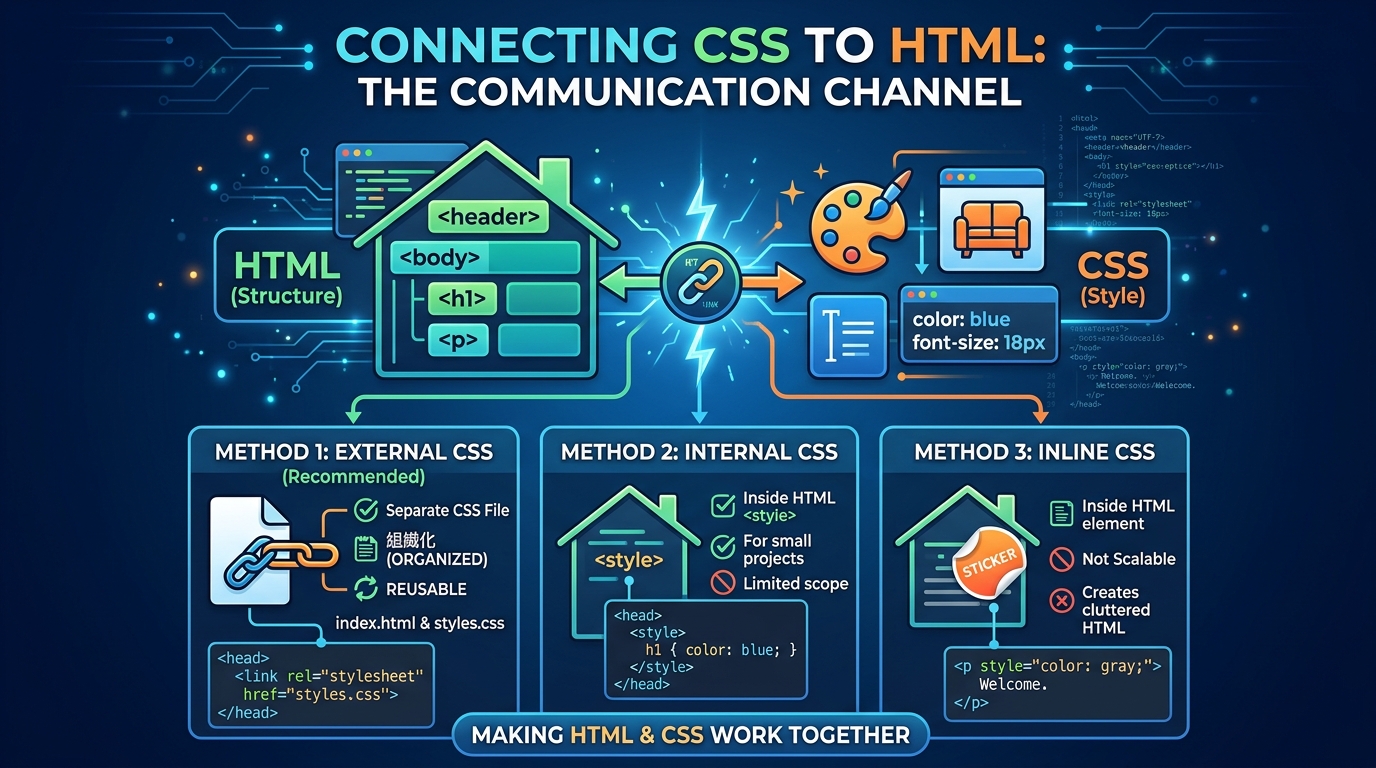
HTML provides structure, while CSS controls appearance
-
External CSS links a separate file and is the best approach
-
Internal CSS lives inside a <style> tag for single pages
-
Inline CSS styles tags directly but is hard to maintain
RECOMMENDED ARTICLES

The @import Element – When Is It Used In CSS?
Discover how the [crayon-6adbda9726a86933498582-i/] rule lets you modularize and combine your CSS files like a pro! Function: The [crayon-6adbda9726aae795563056-i/] rule loads one stylesheet inside another. Placement: It must always appear before...
The Style Element in CSS
Learn how to quickly add CSS directly to your HTML using the [crayon-6adbda9727991267921762-i/] element without any external files required! Definition: The [crayon-6adbda97279bb103723315-i/] element adds embedded CSS directly inside an HTML...

Alternate Stylesheets in CSS
Discover how native HTML and CSS allow users to switch website themes effortlessly without JavaScript! Persistent Stylesheets: Have no [crayon-6adbda97286fa001599243-i/] and are always active. Preferred Stylesheets: Have a...
Before CSS can style a webpage, it must first be connected to the HTML document.
Think of HTML and CSS as two separate files that need a communication channel.
If they are not connected, the browser cannot apply the styles.
Why CSS Needs HTML
HTML provides the content and structure of a webpage.
For example:
Headings
Paragraphs
Images
Links
Forms
CSS then changes how those elements look.
Without HTML, CSS has nothing to style.
Without CSS, HTML looks plain and unformatted.
A Simple Analogy
Imagine building a house.
HTML is the house itself.
CSS is the paint, decorations, and furniture.
You cannot paint a house that does not exist.
Similarly, CSS needs HTML before it can do its job.
Understanding Structure vs Appearance
One of the biggest mistakes early web developers made was focusing only on appearance.
They wanted pages that looked beautiful but often ignored the meaning and structure of the content.
Structure
Structure describes what the content actually is.
Examples:
|
1 2 |
<h1>My Blog</h1> <p>Welcome to my website.</p> |
The browser understands:
This is a heading.
This is a paragraph.
Appearance
Appearance describes how the content looks.
Examples:
|
1 2 3 4 5 6 |
h1 { color: blue; } p { font-size: 18px; } |
Now the heading becomes blue and the paragraph text becomes larger.
Important Principle
HTML answers:
What is this content?
CSS answers:
How should this content look?
Keeping these responsibilities separate makes websites easier to maintain.
The Basic Structure of an HTML Document
A typical HTML document looks like this:
|
1 2 3 4 5 6 7 8 9 10 11 12 13 14 15 |
<!DOCTYPE html> <html> <head> <title>My Website</title> </head> <body> <h1>Welcome</h1> <p>This is my first webpage.</p> </body> </html> Let's examine the major parts. *The html Element* <html> ... </html> |
This is the root element of the webpage.
Everything on the page lives inside it.
Think of it as the container holding the entire website.
The head Element
|
1 2 3 |
<head> ... </head> |
The head section contains information about the page.
Visitors usually do not see this content directly.
Common items placed here include:
Page title
CSS files
Meta information
JavaScript files
The title Element
|
1 |
<title>My Website</title> |
This text appears:
In the browser tab
In bookmarks
In search engine results
The body Element
|
1 2 3 4 |
<body> <h1>Welcome</h1> <p>Hello World</p> </body> |
Everything visible on the webpage goes inside the body.
Examples:
Text
Images
Buttons
Videos
Forms
Ways to Connect CSS to HTML
There are three common methods:
- External CSS
- Internal CSS
- Inline CSS
Method 1: External CSS (Recommended)
This is the most common and professional approach.
A separate CSS file is created.
Example:
|
1 2 3 4 |
/* styles.css */ h1 { color: blue; } |
Then it is linked inside the HTML document.
|
1 |
<link rel="stylesheet" href="styles.css"> |
How It Works
Step 1: Create an HTML file.
index.html
Step 2: Create a CSS file.
styles.css
Step 3: Connect them using the link element.
|
1 2 3 |
<head> <link rel="stylesheet" href="styles.css"> </head> |
The browser loads the CSS file and applies the styles.
Why External CSS Is Best
Advantages:
Keeps code organized
Easier maintenance
Reusable across many pages
Smaller HTML files
Faster website updates
Professional websites almost always use external stylesheets.
Method 2: Internal CSS
CSS can also be written directly inside the HTML document.
This is done using the style element.
Example:
|
1 2 3 4 5 6 7 |
<head> <style> h1 { color: blue; } </style> </head> |
The styles apply only to that page.
When Internal CSS Is Useful
Useful for:
- Small projects
- Practice exercises
- Single-page examples
- Quick testing
- Not ideal for large websites.
Method 3: Inline CSS
CSS can also be written directly inside the HTML document.
This is done using the style element.
Example:
|
1 2 3 |
<p style="color: gray;"> Welcome to my website. </p> |
The style affects only that element.
How Inline CSS Works
|
1 2 3 |
<h1 style="color:red;"> My Heading </h1> |
Why Inline CSS Is Usually Avoided
Problems:
- Hard to maintain
- Creates cluttered HTML
- Difficult to reuse
- Not scalable
- Use it only when necessary.
Understanding the Example Document
Consider this simplified page:
|
1 2 3 4 5 6 7 8 9 10 11 12 13 14 15 16 17 |
<html> <head> <title>My Recipe Page</title> <link rel="stylesheet" href="styles.css"> <style> h1 { color: navy; } </style> </head> <body> <h1>Chocolate Cake</h1> <p style="color: gray;"> This recipe is easy to follow. </p> </body> </html> |
Notice that it contains all three CSS methods:
- External CSS
- Internal CSS
- Inline CSS
The @import Rule
Another way to load CSS is using:
|
1 |
@import url("theme.css"); |
|
1 2 3 |
<style> @import url("colors.css"); </style> |
Note
Although @import works, most modern developers prefer the link element because it generally loads stylesheets more efficiently.
Memory Aid
Think of CSS connection methods like clothing.
External CSS
- A wardrobe shared by many people.
- One change affects many outfits.
Internal CSS
- Clothes stored in one room.
- Only that room uses them.
Inline CSS
- A sticker attached directly to a shirt.
- Only that shirt gets affected.
Recent Comments